“I want to make a game, but I can’t draw or create 3D models…” Are you worried about this? For beginners like you, Unity Assets are your best friend.
Assets are the “materials” needed for game production, such as characters, backgrounds, and music.
You can incorporate high-quality materials created by creators from all over the world into your own game, just like you’re out shopping!
In this article, we’ll gently explain the basics of Unity Assets to boost your development efficiency and how to use the Asset Store wisely!
TOC
What is Unity ?
Unity is the most widely used game development platform (game engine) in the world. Originally, game development required complex programming, but with Unity, even beginners can intuitively move characters or introduce physics (like dropping or bouncing objects).
Multi-platform Support: Once created, your game can be played on various devices such as iPhone, Android, PC, and Switch.
Overwhelming Market Share: Because there are so many users, if you get stuck, you can easily find a solution by searching online.
Abundant Assets: You don’t have to create every material yourself; you can import and combine materials from external sources.
Feature
Description
Development Environment
Supports both 2D and 3D games
Main Language
C# (C-Sharp)
Pricing
Basically free for individual development (with revenue limits)
Unity is an accessible tool that allows even those who say, “I’m not good at programming, but I want to give it a try!” to start game development!
What is the Unity Asset Store?
Unity Asset Store is a “material store for games” where all kinds of materials necessary for game production are sold and distributed.
Think of it as a giant department store where you can find every part needed for game production.
Simply find the parts your game is missing here, download them, and you can immediately import them into Unity.
At the Unity Asset Store, you can find various types of items, such as:
3D Models & 2D Illustrations: Characters, buildings, plants, furniture, etc.
Audio: BGM, sound effects, character voices
Tools & Extensions: Convenient systems that automate tedious programming
VFX (Effects): Magical lights, explosions, rain, snow, and other visual effects
Many other genres of assets useful for game production are also available!
The store offers not only paid items but also tens of thousands of high-quality free assets. We recommend starting by combining free assets to build your own world!
Usage is very simple. Just add the material you want to “My Assets” in your browser and import it via the “Package Manager” within the Unity Editor to add professional-grade materials to your game!
How does the licensing work?
You might wonder, “Is it okay to sell a game made using these assets?” In short, commercial use is generally OK!
Commercial Use Allowed: You are permitted to sell games made with assets or stream them on YouTube, whether the assets were free or paid.
No Redistribution of Assets: Distributing purchased 3D models or programs to others as raw material data, or reselling them, is strictly prohibited.
One License Per User: Basically, one license is required per “person (account)”. If developing in a team, please note that you may need to purchase for the number of people involved.
Item
Dos / Don’ts
Game Sales
◯ Selling is perfectly OK!
Modification
◯ Modifying to fit your game is OK!
Reselling Materials
× Reselling the assets themselves is strictly prohibited!
Sharing with Others
× Generally one purchase per person (*Exceptions apply)
*Special contracts (Site Licenses) may be available for large development teams or educational institutions to share across the entire organization.
On the Unity Asset Store, the “Standard Unity Asset Store License” is most common, but in rare cases, special licenses (such as for educational use) may be set.
It’s a good habit to check the “License type” on the asset’s detail page before purchasing!
How to use the Unity Asset Store
Here are the steps from finding a material you like to adding it to your game!
1. Register for a Unity Account (Free)
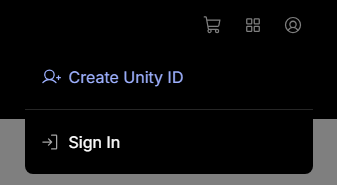
Create Unity ID
To use the Unity Asset Store, you first need to create your own account (free).
Select “Create a Unity ID” from the person icon at the top right of the official website.
If you have a Google or Apple account, you can easily register for free just by linking them. (You can also register with an email address if you don’t have one!)
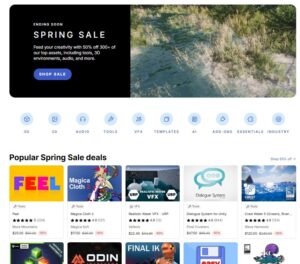
Access the Unity Asset Store and search for materials you like. Check the top page for information on current sales!
You can also narrow down your search to specific genres like 3D, 2D, or Tools.
3. Get the asset you want!
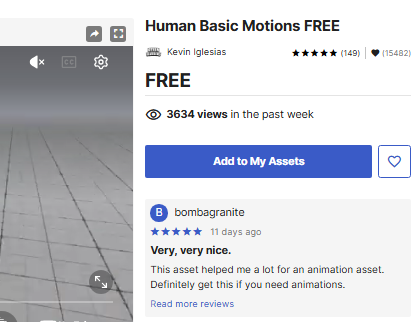
Asset Detail
Once you’ve decided on a material, you can obtain it by clicking “Add to My Assets” (for free assets) or “Buy Now”.
The asset will now be registered in your library!
Clicking the ♡ mark on the asset detail page saves it to your Wishlist. This is very useful for when you think, “I won’t buy it now, but I want to use it later” or “I’ll buy it when it goes on sale!”
4. Open the Package Manager
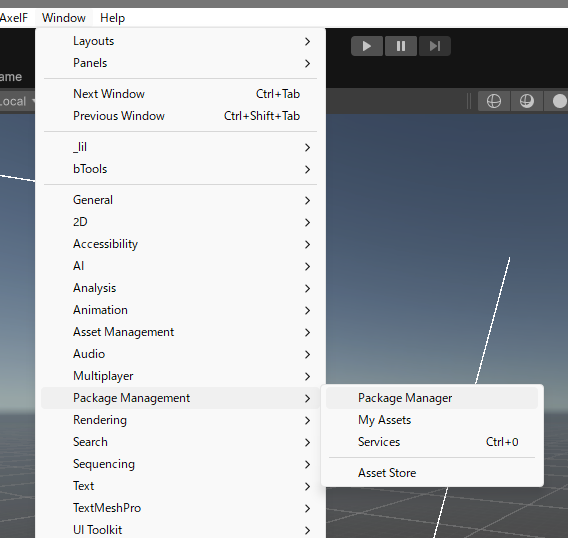
Package Manager
When you want to use an asset added to your library, launch the Unity Editor and open Window > Package Manager from the top menu.
5. Download & Import the material
Download & Import
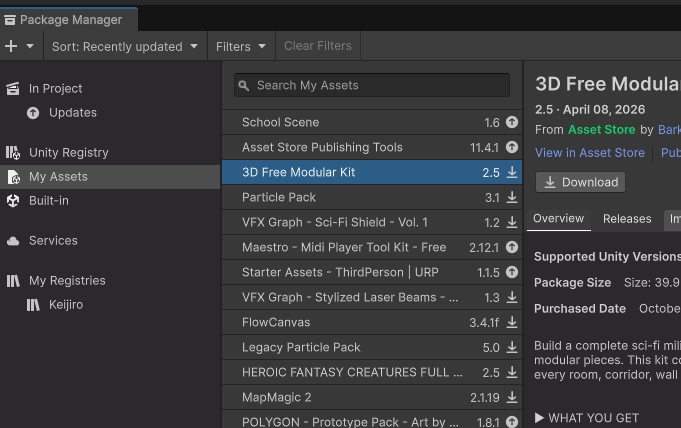
Switch to My Assets from the left menu in the Package Manager.
Select the target material from the list, click Download, and finally click Import to finish!
*If it doesn’t appear, please make sure the account logged into the Unity Editor is the same as the account logged into the store in your browser!
Recommended Assets by Genre
On this site, we have many “Recommended Asset Roundup” articles that dive deeper into each genre.
Please check them out according to the game you want to create!
Recommended Asset Collections
In the following articles, we introduce essential assets that can be applied to any type of game!
For those who feel “making game mechanics from scratch is hard…” These articles introduce template assets that are recommended when you want to finish the foundation and make a game as fast as possible.
あわせて読みたい
25 Best Unity Templates and Starter Kits for 2026“I want to make my own RPG someday.” “I want to build a world like those trending survival games.” …That dream could start taking shape today if you use te…
Horror Assets
Dimly lit mansions, eerie footsteps, and heart-pounding scares… These materials are perfect for maximizing horror in your game.
We introduce many other assets as well, so please check the “Roundup” category on the right side of this site!
あわせて読みたい
Best Horror Assets for Unity 2026“I want to create a horror game with my own hands that makes players tremble with fear.” Many open Unity with this goal, but once development begins, they fi…
Conclusion
Unity Assets are ready-to-use materials that help you turn your game ideas into reality.
By skillfully using high-quality materials made by professionals, even beginners can complete the game they imagined in a short period of time.
Try downloading one free asset and let it appear in a game you’ve made. The thrill of seeing a character start moving on the screen is where the true fun of game development begins!
Enjoy creating your own wonderful games while referring to other articles on this site!


 [FREE] Hit Impact Effects FREE – Enhance Your Combat Visuals , A Collection of High-Quality Strike Effects