This page contains affiliate links.
Supercharge Your Unity Dev Speed: Best Efficiency Assets for 2026
Developing in Unity, especially as projects grow larger, can be frustrating due to editor sluggishness and long build times.
Everyone has likely thought at least once, “If only things ran more smoothly, I could focus more on actually making the game…”
As of 2026, alongside Unity’s evolution, the Asset Store lineup has expanded significantly. New **assets to improve Unity efficiency** are emerging one after another, including AI-driven optimization and acceleration tools specialized for the latest URP / HDRP.
In this article, we have carefully selected and introduced recommended efficiency and speed-up assets that can boost your development speed just by installing them!
TOC
Build & Compilation Optimization Assets
Hot Reload
Improve development efficiency by reflecting code changes instantly
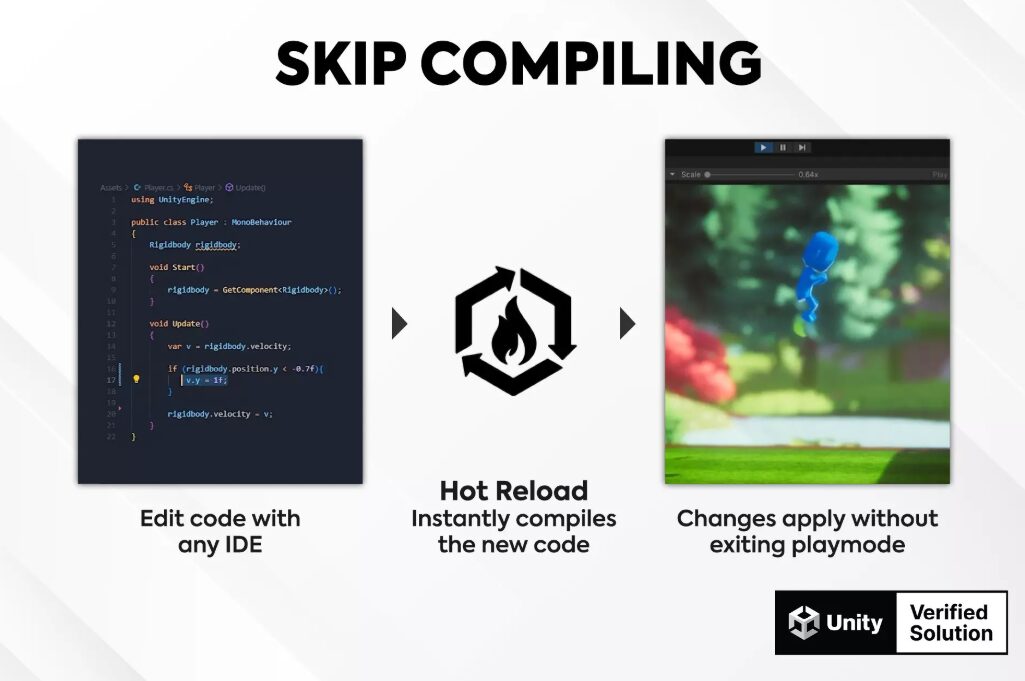
Hot Reload is a tool that allows C# code edits to be reflected in the Unity Editor without waiting for compilation.
Since you can apply logic changes while the program is still running, there is no need to stop the game or wait for domain reloads every time you check an operation. Even in large-scale projects, changes are reflected in milliseconds, enabling smooth trial and error.
- Apply code edits while maintaining execution state and variable values
- Supports various C# features including method additions, generics, and Burst
Hot Reload – Unity Asset Store
Ultimate RNG
High-speed random number generation engine
Ultimate RNG is a next-generation pseudo-random number generation library designed to fully utilize Unity’s Burst Compiler and SIMD technology.
It specializes in generating massive amounts of random numbers, which often becomes a bottleneck with the standard UnityEngine.Random, and achieves overwhelming processing speeds through a unique zero-copy architecture. It serves as a valuable asset for improving performance in games where even a 1ms delay is unacceptable, such as automated terrain generation or games handling massive amounts of units.
- Equipped with 15 types of algorithms, allowing for optimal random number generation tailored to your needs
- Supports custom seeds guaranteeing 100% determinism, making it ideal for multiplayer
- High-speed computation powered by Burst Compiler and SIMD technology
Ultimate RNG – Unity Asset Store
Memory & Rendering Optimization Assets
ALINE
Accelerate rendering for debugging
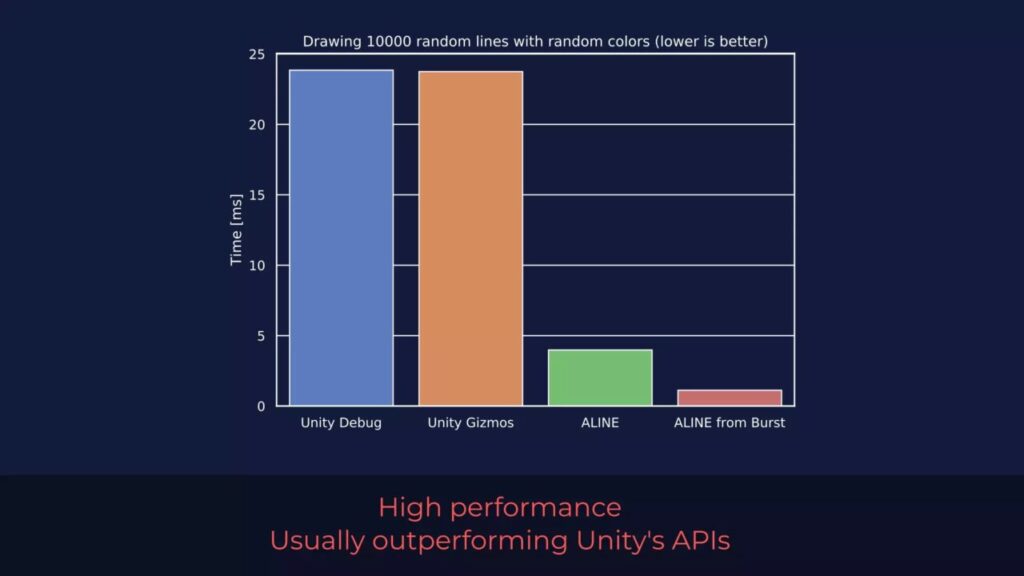
ALINE is a tool that allows you to display lines and shapes on screen faster and more flexibly than Unity’s standard rendering functions.
It can be used not only for debugging work in the editor but also for in-game effects after building or as a level editor UI. It provides a simple and consistent API, enabling the visualization of complex 3D data while maintaining performance.
- Allows debug rendering directly from within Burst-compiled code or ECS jobs
- Achieves smooth lines without the need for post-processing
- Standard features include 3D text labels and various shape primitives
Rukhanka Animation System 2
Accelerate animations for massive amounts of characters with ECS and GPU!
Rukhanka Animation System 2 is an animation system optimized for Unity’s ECS (Entity Component System).
By utilizing parallel data processing and GPU Compute Shaders instead of the standard Animator, it can animate massive numbers of characters simultaneously while significantly reducing CPU load. Despite being ECS-based, it features a workflow similar to the familiar Mecanim, making the transition barrier low.
- Thorough parallelization of CPU processing using Burst Compiler and Job System
- High-speed animation calculations using GPU Compute Shaders
- Smooth conversion from standard features such as Animator Controller and Humanoid
Rukhanka Animation System 2 – Unity Asset Store
MeshFusion Pro
Rendering optimization tool to accelerate by merging meshes
MeshFusion Pro : Ultimate Optimization Tool is an optimization tool that efficiently combines multiple meshes to reduce draw calls and improve FPS.
Unlike conventional static merging tools, its biggest feature is that **individual objects can still be freely moved and rotated even after merging**. By managing the scene in cells, it increases culling accuracy and dramatically improves both rendering load and memory usage.
- Automatically updates the merged state in real-time even if objects move during execution
- Reduces memory usage by up to half through mesh data optimization
- Compatible with objects generated at runtime and procedural meshes
MeshFusion Pro : Ultimate Optimization Tool – Unity Asset Store
Mirage Pro – Runtime Impostors Baking System
Reduce rendering load with automatic runtime baking
Mirage Pro is a tool that reduces rendering load by replacing complex 3D models with lightweight pseudo-3D images (impostors).
Its primary feature is the ability to generate impostors during game execution (runtime) after building. This allows for the dramatic reduction of draw calls and polygon counts even for dynamically generated objects or vast auto-generated maps without sacrificing visual appearance, thereby improving performance.
- Instantly turn dynamically generated objects into impostors during game execution
- Improve frame rates by up to 10x in high-density scenes
- Standard support for advanced optimization features such as VR compatibility and LODGroup integration
Super Level Optimizer 2
Optimization tool to reduce rendering load by merging materials
Super Level Optimizer 2 is an asset that automatically combines meshes and materials within a scene to significantly reduce draw calls.
It supports not only static objects but also animated skinned meshes and LOD groups, improving performance while maintaining visual quality. With its intuitive operability, it can be introduced regardless of project size, from beginners to advanced users seeking fine-tuned adjustments.
- Capable of merging complex skinned meshes while preserving bones and animations
- Increases batching efficiency and reduces material count through automatic texture atlas generation
- Fine optimization settings for everything from mobile to high-end PC
Super Level Optimizer 2 – Unity Asset Store
Editor Extension Assets
Asset Inventory 4
Management asset to find vast amounts of assets instantly
Asset Inventory 4 is a management tool that lets you search and preview all your purchased assets in bulk without importing them into your project.
With detailed filtering options like file name, image size, audio length, and color, you can identify the materials you need in seconds. It can index not only your Asset Store purchase history but also local folders, significantly shortening the time spent searching for assets.
- Import only the necessary files individually, including dependencies, without importing the whole package
- Preview 3D models, VFX, audio, and animations on the spot before importing
- AI-driven tagging and an advanced search engine
Asset Inventory 4 – Unity Asset Store
CommandPocket
Instant access to all functions with just a keyboard
CommandPocket – Ultimate Productivity Suite is a productivity tool that adds an intuitive, Spotlight-search-like interface to the Unity Editor.
Instead of navigating complex hierarchical menus, you can search for assets, create objects, and execute various commands via shortcut keys. This set of features, born from the need to “operate faster” on the development floor, dramatically streamlines daily routine work.
- Consolidates asset searching, command execution, and object creation into a single search bar
- Integrates a calculator, notes, color picker, and clipboard history within the editor
CommandPocket – Ultimate Productivity Suite – Unity Asset Store
Root Select Locker
Prevent accidental selection of child objects and improve workflow efficiency
Root Select Locker is an editor extension tool that prevents operation errors in Unity’s scene view.
It features a redirection function that automatically selects the parent (root) object when a child element of a Prefab is clicked. This prevents mistakes such as accidentally moving a doorknob or a small part of a complex model, thus stabilizing the speed of level design.
- Automatically redirects click operations in the scene view to the root object
- Toggle the function on and off with a single button in the inspector
- Freely customize the button appearance and text
Root Select Locker – Unity Asset Store
Ultimate Preview Bundle
Assets to streamline the Preview window
Ultimate Preview Bundle is a definitive asset package containing three tools (Pro, Animator Add-on, Thumbnails) that significantly expand Unity’s standard preview functions.
It allows you to intuitively check VFX, UI, and complex animations within the inspector, and further resolves the stress of finding materials by automatically updating Project window thumbnails to high-quality images.
- Supports previews for assets that are usually difficult to view, such as UI, Particles, and VFX Graph
- Automatically generates and manages high-visibility thumbnails for all assets in the project
- Check Animator movements in detail directly within the editor
Ultimate Preview Bundle – Unity Asset Store
UModeler X Plus
Next-generation 3D modeling asset integrated within Unity
UModeler X Plus is an integrated 3D production tool that handles everything from modeling to rigging and painting within Unity.
It eliminates the need for external software, allowing you to create shapes with intuitive SketchUp-like operations and perform layer-based painting (like Photoshop) and automatic rigging. From programmers to artists, it eliminates downtime caused by switching between tools, maximizing creative work time.
- Intuitive operations allow even beginners to create 3D content quickly
- Equipped with layer-based painting and UV editing functions; texture production is also completed within Unity
- Automatic rigging function speeds up character setup without using external software
UModeler X Plus – Unity Asset Store
AI Assistant Assets
Unity AI
Official peace of mind, next-generation AI directly connected to the editor
Unity AI is the official Unity AI assistant designed specifically for game development.
Unlike external assets, it has a deep understanding of your project context based on Unity’s 20 years of accumulated best practices, ensuring more accurate and safe support.
To use it, an update to “Unity 6 or later” is required, and you can start simply by clicking the AI button in the editor to install the package.
Currently, a **free trial** is available for Unity Personal users, and Pro users or above can use it as-is within their existing subscription. With the stability unique to an official tool, you can dramatically streamline your workflow!
Conclusion
In 2026 Unity development, improving efficiency via assets and AI is now essential!
By introducing the tools introduced today, you will be freed from stresses like waiting for compilation and rendering loads, allowing you to devote more time to creating actually interesting game elements.
Choose the ones that best fit your project and accelerate your development speed!
- Best Unity Background Assets (2D & 3D) for 2026
- What are Unity Assets? A Beginner's Guide to the Asset Store!
Related Posts
-
 What are Unity Assets? A Beginner’s Guide to the Asset Store!
 -
20 Best Unity Effect Assets (2026): URP, HDRP, VFX Graph & More
-
【2026】Top Unity Robotics Assets You Need to Try Right Now!
-
 Voxel Play 3 – Fast Voxel Generation and Infinite World-Building Tools for Unity
 -
[FREE] Hit Impact Effects FREE – Enhance Your Combat Visuals , A Collection of High-Quality Strike Effects
-
Best Unity Assets for Farming Games in 2026: Build Your Dream Farm
-
Best Unity Assets for Making a Survival Crafting Game (2026 Guide)
-
【2026】Top Pick Unity School Assets!